Should You Buy the Eureka Axion Gaming Chair in 2026? A Deep Dive
Introduction — My experience at a glance
I've been using the Eureka Axion gaming chair for about six months as my primary desk chair for work and gaming. I bought it because I wanted something that balanced ergonomic support with a modern look — not the bulkier race-car aesthetic that some gaming chairs push. After several months of daily use (roughly 8–10 hours on weekdays and longer sessions on weekends), I feel like I can give a practical, hands-on assessment: what worked, what didn't, and who I think this chair is for.
Unboxing and assembly
When the Axion arrived, the packaging was compact and everything was individually wrapped. I assembled it myself in about 35–45 minutes; I'm not particularly patient with instructions, but the manual was serviceable. The included Allen wrench and screws were adequate — you don't need extra tools beyond a Phillips screwdriver if you want to tighten a few bits. One thing I noticed right away was that the instructions skip a couple of small steps that are obvious only in hindsight (for example, the orientation of one bracket). I had to backtrack once, which added ten minutes. If you're not comfortable with mildly fiddly assembly, plan for an hour rather than half an hour.
Materials and build quality
What I appreciated: the Axion feels solid. The frame has a reassuring weight and the base is thickly cast, which gives me confidence during dynamic movement. The upholstery on my unit is the PU-leather option, and it looks good — matte finish, no overly glossy plastic look. The seat foam is firm but with a soft top layer. After months of sitting I haven't noticed significant sagging.
What bothered me: some of the small fit-and-finish details could be better. On my chair the stitching where the armrest meets the seat cover was a bit uneven; it's cosmetic, but noticeable up close. Also, the plastic trim around the recline lever creaks slightly when you lean back and shift. It's not a dealbreaker, but if you're used to extremely tight tolerances (think higher-end office chairs), this won't feel as refined.
Comfort and ergonomics — real-world feel
I'm 6'0" and about 185 lbs, and the Axion fits me well. The seat depth is generous enough that my thighs are supported without pressure behind the knees, and the seat width accommodates my natural shift and fidgeting while working. The lumbar support is adjustable via a built-in mechanism rather than a removable pillow, which I prefer because it stays in place.
After testing for extended sessions (12+ hours on a couple of occasions), the chair remained comfortable, but my findings were nuanced:
- I appreciated the lumbar range — it moves enough to suit both my upright writing posture and the slightly reclined "content-creation" posture I use when editing videos.
- The headrest is attached and slightly angled; for shorter people it might feel a bit high. I use a separate neck pillow occasionally because I prefer softer head support.
- The armrests are 4-way adjustable (height, forward/back, pivot, and lateral). That versatility mattered when I swapped between keyboard-and-mouse, console controller, and drawing tablet. However, the padding on the armrests could be thicker — after long sessions my forearms felt the hard plastic core beneath the foam.
Adjustability and features
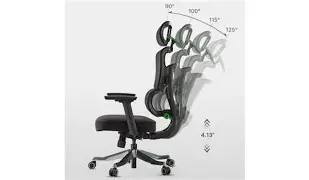
The Axion offers the usual suspects: height adjustment, tilt and recline with a lock, a tension knob for recline resistance, and the multi-directional armrests. Where it diverges a bit from entry-level chairs is the lumbar mechanism — it's an internal, ratcheting support that you can move up or down and adjust firmness. This is genuinely useful; on cheaper chairs the lumbar "pillow" often slides around or loses shape.
One small disappointment: the recline lock isn't as precise as I expected. It locks at a handful of set angles rather than infinitely, so you may find the one comfortable angle isn't an available lock position. For me, that meant leaning back and using the tension to hold a semi-reclined position rather than locking it in place fully.
Durability — what months of use showed
After six months of daily use, the seat foam has softened slightly but hasn't developed a permanent dip. The PU finish shows minimal peeling; that's a good sign because cheaper PU can start to flake after a few months. The casters roll smoothly on hardwood and a low-pile rug, though on thicker carpet they feel stiffer. The gas lift has held height without sagging.
Looking for the best Electronics deals on Amazon?
See Deals →That said, the painted metal on one of the armrest brackets has a faint scratch from when I bumped it with a headset stand. Again, nothing structurally worrying, but if you're particular about cosmetic perfection, expect some minor wear.
Performance for different use cases
Here's how the Axion fared in different scenarios in my home setup:
- Gaming: Excellent for long sessions. The lumbar and tilt make it comfortable for marathon runs. The slightly firmer seat helps keep me alert during competitive play.
- Work (coding/writing): Very good. I appreciate the lumbar adaptability for switching from focused typing to relaxed thinking postures.
- Creative work (drawing/editing): Good, but the armrest padding could be better for resting wrists during drawing tablet use.
- Reading/relaxing: Acceptable. I wish the headrest were softer for longer relaxed reading stretches.
Sound and movement
Some chairs are completely silent; others creak and click. The Axion sits in the middle. The first few weeks there was a mild squeak when swiveling that disappeared after I tightened a couple of bolts. Since then the most audible noise is a faint plastic creak when I lean back and shift. The mechanism for tilt is smooth, and the casters roll well — not whisper-quiet, but nothing irritating.
Price vs value
In my experience, the Axion sits in the mid-range of the market. You get features that feel like an upgrade over bargain chairs (built-in lumbar adjustment, solid base, multi-directional armrests) without the premium price of top-tier ergonomic office chairs. For the money, I felt like I got solid value — that said, if you prioritize the absolute best materials (real leather, premium upholstery, ultra-durable soft-touch plastics), you'll pay more elsewhere.
Pros & Cons
- Pros
- Comfortable for long sessions with a firm-but-not-rock-hard seat
- Built-in, adjustable lumbar support that actually works
- Multi-directional armrests are genuinely useful for different tasks
- Solid build and good-looking, understated design
- Easy-ish assembly — no special tools required
- Cons
- Fit-and-finish has minor imperfections (stitching, small creaks)
- Armrest padding is thinner than I'd like for long creative work
- Recline lock has limited fixed angles, not infinitely adjustable
- Headrest is a little firm and sits high for shorter users
Comparison: Eureka Axion vs. other popular chairs
Below is a concise, opinion-based comparison table that reflects my experience and how the Axion stacks up against a few well-known options. These are broad strokes to help you place the Axion in the landscape, not a technical spec sheet.
| Chair | Comfort (long sessions) | Build Quality | Adjustability | Price Tier | Best for |
|---|---|---|---|---|---|
| Eureka Axion | Very good — firm seat, effective lumbar | Solid mid-range; some cosmetic issues | High — lumbar, 4-way armrests, recline | Mid | Gamers and hybrid workers seeking ergonomic value |
| Secretlab Titan (reference) | Excellent — plush and supportive over time | High — premium finishes | Very high — lumbar dial, many customizations | Premium | Users wanting high-end gaming comfort |
| Herman Miller Aeron (reference) | Excellent — breathable, long-term support | Very high — built to last | High — ergonomic office-focused adjustments | Luxury | Office professionals seeking clinical ergonomics |
| DXRacer-style entry chair (reference) | Good short-term, variable long-term | Variable — often lighter construction | Medium — basic adjustments | Budget to mid | Gamers on a tight budget who want the aesthetic |
Buying guide — who should consider the Axion?
If you're trying to decide whether the Eureka Axion is right for you, here are the questions I asked myself before I bought it, and how they apply based on my experience.
1. Do you sit for long periods?
If you spend most of your day at a desk, the Axion is a solid choice at its price point. The lumbar adjustability and firm seat help keep posture in check during extended use. If you need a chair for occasional gaming only, it might be more chair than you need.
2. Do you prefer a softer, cushier seat or a firmer foundation?
I prefer a firmer seat because it helps me stay alert; the Axion delivers that. If you want a cloud-like, sink-into-it experience, look at higher-end premium models instead.
Find top-rated Electronics products at great prices.
Shop Amazon →3. How important is premium finish and silence?
If cosmetically perfect trim, ultra-silent operation, and feather-light mechanisms are priorities, you might feel a bit underwhelmed by the Axion's small creaks and the occasional misaligned stitch. For everyday practical use, these are minor.
4. Do you need heavyweight support or specialty features?
The Axion seems robust for most users, but if you require unusually high weight ratings or specialty office-chair certifications, check the manufacturer's specs against your needs. In my testing, the chair felt stable and solid for my frame and use patterns.
5. What's your desk setup like?
If your desk is low and you like a deep recline, test how the Axion's headrest height and seat depth work with your monitor setup. I adjusted my monitor height slightly to match my preferred sightlines while reclined.
Maintenance tips from my experience
After months of use, here's what I did to keep the Axion in top shape:
- Every month I tightened visible bolts and checked the base for wobble — a quick five minutes that prevented creaks.
- I cleaned the PU upholstery with a damp microfiber cloth and a mild soap solution; no harsh chemicals. This kept the finish consistent and prevented surface grime build-up.
- For the casters, I vacuumed under the base occasionally to remove hair and dust that can make them roll poorly on carpet.
Final thoughts and conclusion
After using the Eureka Axion for several months, what I found was a chair that hits a sweet spot for many people: it gives you real ergonomic features (not just the look of them), a sturdy build, and a comfortable seat that performs well across gaming and work tasks. I was pleasantly surprised by the built-in lumbar mechanism — it genuinely improved my comfort during multi-hour sessions.
On the flip side, I noticed some small shortcomings that kept it from feeling like a premium, high-end office chair: thinner armrest padding, minor cosmetic imperfections, and a recline lock that favors a handful of angles instead of infinite positions. Those are the kinds of trade-offs I expected at this price point, and they didn't outweigh the chair's day-to-day usefulness for me.
In my experience, buy the Eureka Axion if you want a comfortable, practical, and well-featured chair without stepping up into premium pricing. If you want the absolute best materials, hyper-quiet operation, or ultra-fine adjustability, consider stretching your budget to higher-tier office chairs. For most gamers and hybrid workers looking for a balance of comfort, support, and style, the Axion is a very reasonable and reliable pick.